Extended Payload
The Extended Payload feature is enabled by selecting Extended Payload in the Payload Mode field of the parent port panel. This enables the feature for all streams on this port. Once the extended payload is enabled, it is possible to set the desired size of the Packet Content area for the stream using the stream’s Extended Payload Editor.
Extended Payload Editor is a powerful UI feature that allows you to customize/configure the entire payload area of a stream in addition to the predefined payload pattern e.g. Incrementing 8-bits, Pattern, Random, and PRBS-31.
Please note that the Extended Payload Editor is only enabled when you set the port’s Payload Mode to Extended Payload as shown in Fig. 5.117. This will enable all the streams under the port to accept the extended payload configuration.
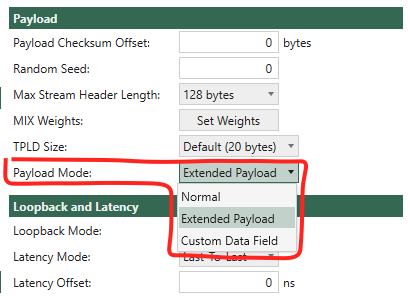
Fig. 5.117 Set port’s payload mode to Extended Payload to enable the feature.
You can find the Extended Payload Editor as shown in Fig. 5.118 on the stream once the parent port has Payload Mode to Extended Payload. Click Open Editor and paste the payload data in hex strings and click OK. Then you can see your payload data in a byte-ascii grid view where each row contains 16 bytes.
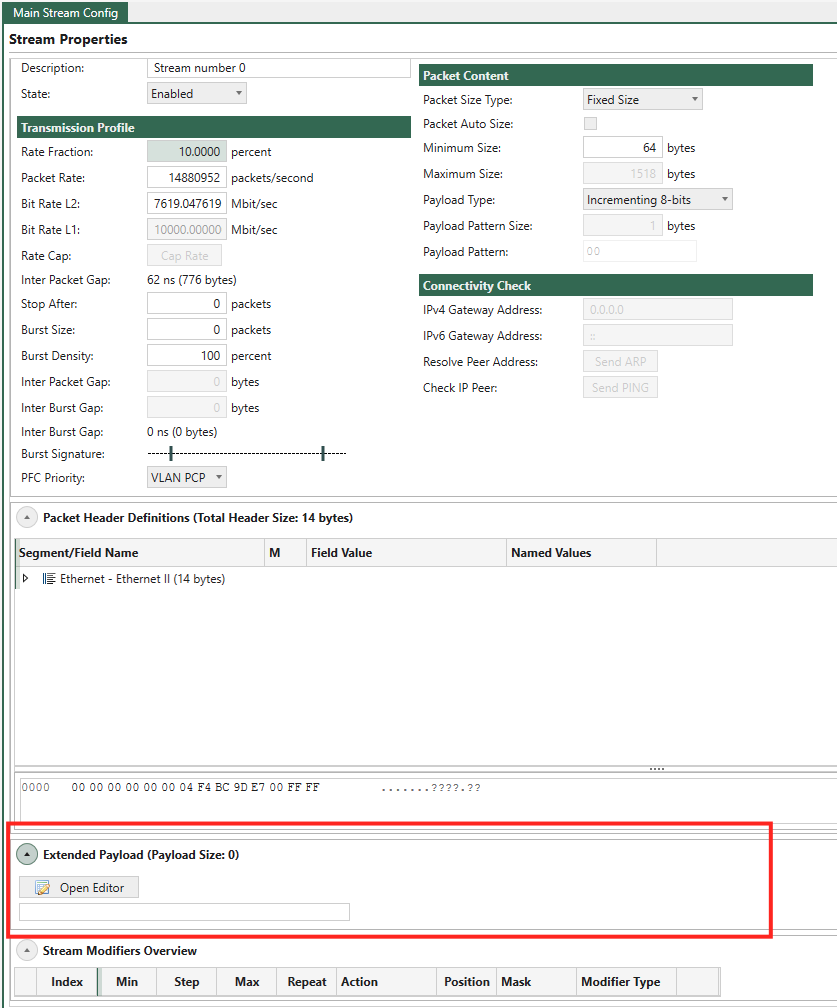
Fig. 5.118 Open Extended Payload editor
If you want to do adjustment on some bytes, you can click on the byte and enter the value as shown in Fig. 5.119.
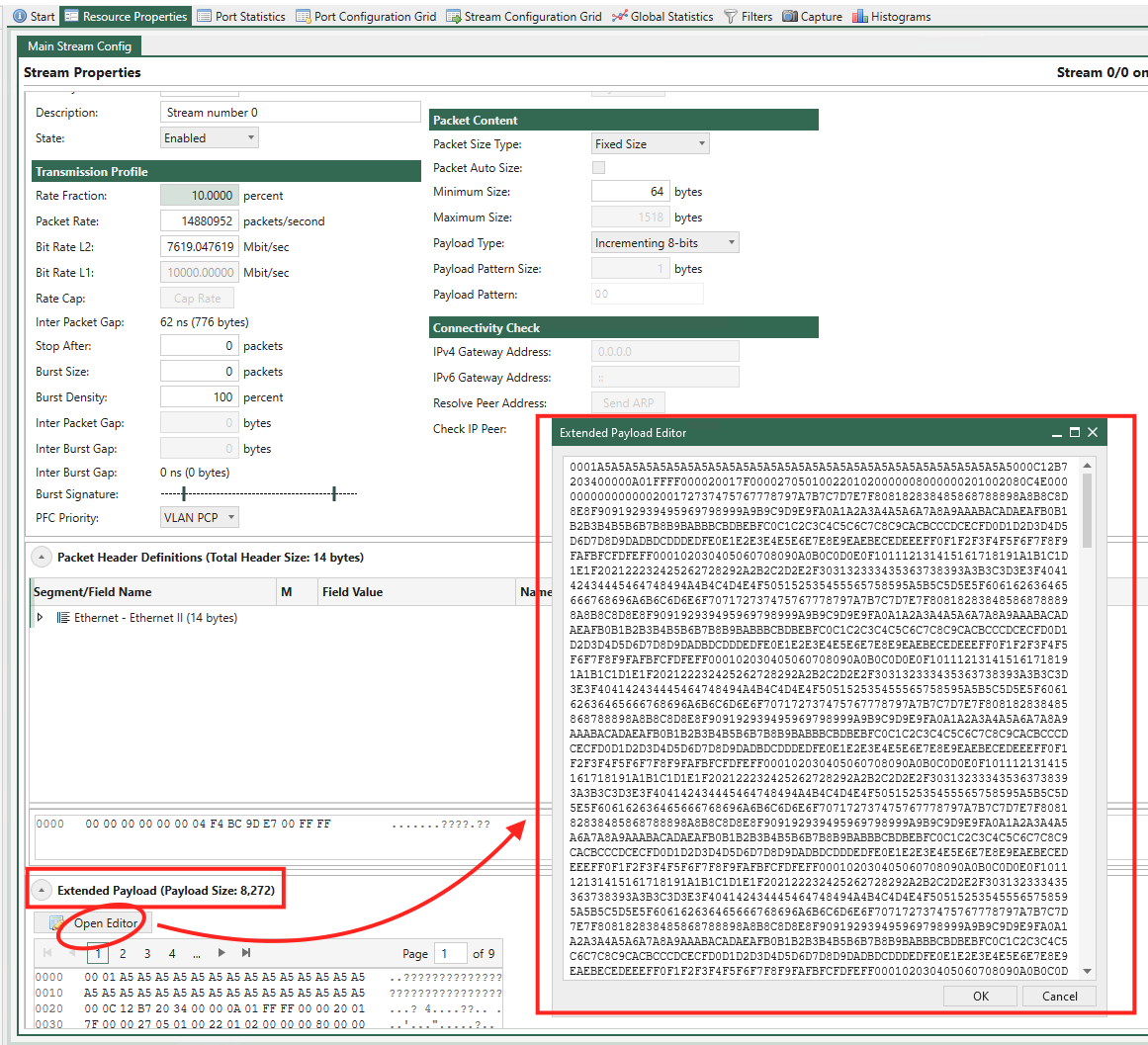
Fig. 5.119 Adjust some byte values
If the Extended Payload is not empty, the stream will use the provided payload data. If empty, the stream will use the configuration from .
To quickly import the payload data from a pcap file, you can use Wireshark to copy the payload data , as shown in Fig. 5.120, and then paste it into the Extended Payload Editor.
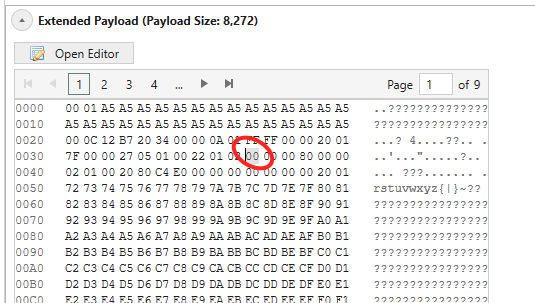
Fig. 5.120 Copy packet payload from pcap
Note
Please note that the total test packet size must be minimum the size of the stream protocol headers + extended payload + TPLD + FCS.
If the total packet size is shorter than that, the Extended Payload is cut to fit the test packet.
If it is longer, padding will be inserted between the Extended Payload and the TPLD.
Like a CDF, the Extended Payload is fit into a block, which is 2^n bytes long. The block sizes can range from 64 bytes to MTU for the port; the smallest size where the Extended Payload fits in is used. Bytes in the block that is not used by the Extended Payload is filled with padding like CDF blocks.
Fig. 5.121 illustrates a test packet with 120 bytes Extended Payload in a 166 byte test packet. For the test packet in Fig. 5.121 this means that there is room for the Extended Payload plus the remaining 8 bytes in the memory block that the Extended Payload occupies.
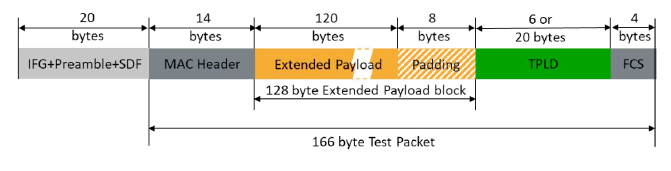
Fig. 5.121 Test packet with 120 bytes Extended Payload
See also
Read more in Freely Programmable Test Packets (Custom Data Fields) for details.
Does My Test Module Support Extended Payload?
In the Port Capabilities part of the Port Properties panel you can see if the test module supports CDFs: If Ext. Payload Supported is True, the test module supports Extended Payload (see Fig. 5.116).
Extended Payload Memory Allocation
The Extended Payload feature is a special application of the CDF feature with an offset matching the headers in the test package. Therefore, the sections on CDF specifications and CDF Memory Allocation also apply for the Extended Payload feature
Modifiers on Extended Payload
It is possible to set a modifier in the Extended Payload area just as it is for a normal protocol field.
Tip
It is different from CDF because Extended Payload is fundamentally a more advanced payload compared to the basic.