RX Secure Channels
Create RX SC

Fig. 5.26 RX SC Controls
Click the button Add to create a new RX SC. The following dialog will appear. You should assign an index value to the RX SC. The index value should be unique and in the range of 0-127. The default value is 0. The index value will be used as the Port Identifier in the DUT SCI and XPN SSCI.
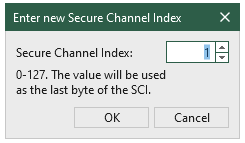
Fig. 5.27 RX SC Index Dialog
Important
Since the last byte of the SCI value consistently matches the SC index, it’s recommended to use SC index 0 and 1 with caution. This is due to the following reasons:
00is reserved for SCB mode only. It is recommended not to be used when theSCI in MACsecisWith SCI.01is reserved for End Station mode only. It is recommended not to be used when theSCI in MACsecisWith SCI
The last two bytes of SCI will be ignored by the traffic generator when the SCI in MACsec is End Station. It will be hardcoded to 00 01.
Remove RX SC
Fig. 5.28 RX SC Controls
Click the button Remove to remove the selected RX SC.
Load TX SC
Fig. 5.29 RX SC Controls
You can quickly create a RX SC configuration that matches a TX configuration to create a pair by loading a TX SC configuration using Load TX Settings. After the loading, the RX SC configuration will be displayed in the RX SC Configuration Grid. It will have the same necessary parameters as the TX SC configuration.
Tip
The best practice is to create a TX SC configuration first and then load it to the RX SC configuration. This will ensure that the RX SC configuration matches the TX SC configuration.
Load RX SC
Fig. 5.30 RX SC Controls
You can import a RX SC configuration from a file by clicking the button Load RX Settings. After the loading, the RX SC configuration will be displayed in the RX SC Configuration Grid.
This is useful when you want to copy the RX SC configuration from one port to another port. You can save the RX SC configuration to a file and then load it to another port.
Save RX SC
Fig. 5.31 RX SC Controls
You can save the RX SC configuration to a file by clicking the button Save Settings. The RX SC configuration will be saved to a file with the extension .rxsc.
This is useful when you want to copy the RX SC configuration from one port to another port. You can save the RX SC configuration to a file and then load it to another port.
Enable MACsec on RX Port
Fig. 5.32 RX SC Controls
Select Enable MACsec on RX Port to enable MACsec on the RX port. This will make the port ready to decrypt the incoming MACsec packets if the RX SC is configured correctly. If disabled, the port will not try to decrypt the incoming MACsec packets. (pass-through mode)
RX SC Configuration

Fig. 5.33 RX Secure Channel Configuration Grid
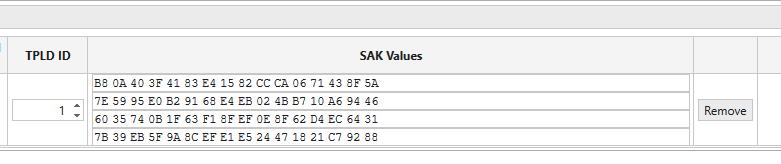
Fig. 5.34 RX Secure Channel Configuration Grid (continued)
Each port can have up to 128 RX SCs. They will be listed in the RX SC Configuration Grid. The RX SC Configuration Grid shows the following information for each RX SC:
Index: The index of the RX SC
Description: The description of the RX SC
Cipher Suite: The cipher suite used by the RX SC
GCM-AES-128: GCM-AES-128 (IEEE 802.1AE-2018 Clause 14.5) (default)GCM-AES-256: GCM-AES-256 (IEEE 802.1AE-2018 Clause 14.6)GCM-AES-XPN-128: GCM-AES-XPN-128 (IEEE 802.1AE-2018 Clause 14.7)GCM-AES-XPN-256: GCM-AES-XPN-256 (IEEE 802.1AE-2018 Clause 14.8)
DUT SCI: The SCI of the port’s RX SC. Default value is port MAC address (6 bytes) + the SC index (2 bytes).
Note
The last byte of the SCI value is always the same as SC index and is not allowed to be changed. The second last byte of the SCI value is always 0x00 and is not allowed to be changed.
XPN SSCI: The XPN Short SCI of the port’s RX SC when XPN cipher suite is in use. the XPN Short SCI of the RX SC, 32 bits. Default value is
00 00+ the SC index (2 bytes) . The SSCI values must be the same for both TX and RX SCs.XPN Salt: the XPN salt of the RX SC, 96 bits. Default value is
00 00 00 00 00 00 00 00 00 00 00 00. The XPN salt values must be the same for both TX and RX SCs.Confidentiality Offset: The confidentiality offset of the port’s RX SC. Default to
0. Allowed values are0, 30, 50. All the other values will have<NOTVALID>response.Starting PN Value: the first PN number RX SC expects to receive. Default to 1, maximum 2^64. Allowed to be zero.
TPLD: The test payload ID of the stream on the TX port that this RX SC expects to receive. Default to the RX SC index.
SAK Values: the SAK key values of the RX SC. Default to all-zero.
The length of the key value should be:
128 bits for GCM-AES-128 and GCM-AES-XPN-128
256 bits for GCM-AES-256 and GCM-AES-XPN-256.
The number of keys allowed is:
4 for GCM-AES-128 and GCM-AES-XPN-128
2 for GCM-AES-256 and GCM-AES-XPN-256.
RX Statistics
The RX statistics are displayed under Port Statistics. Go to MACSec RX Statistics.