3.6.4. Link Negotiation
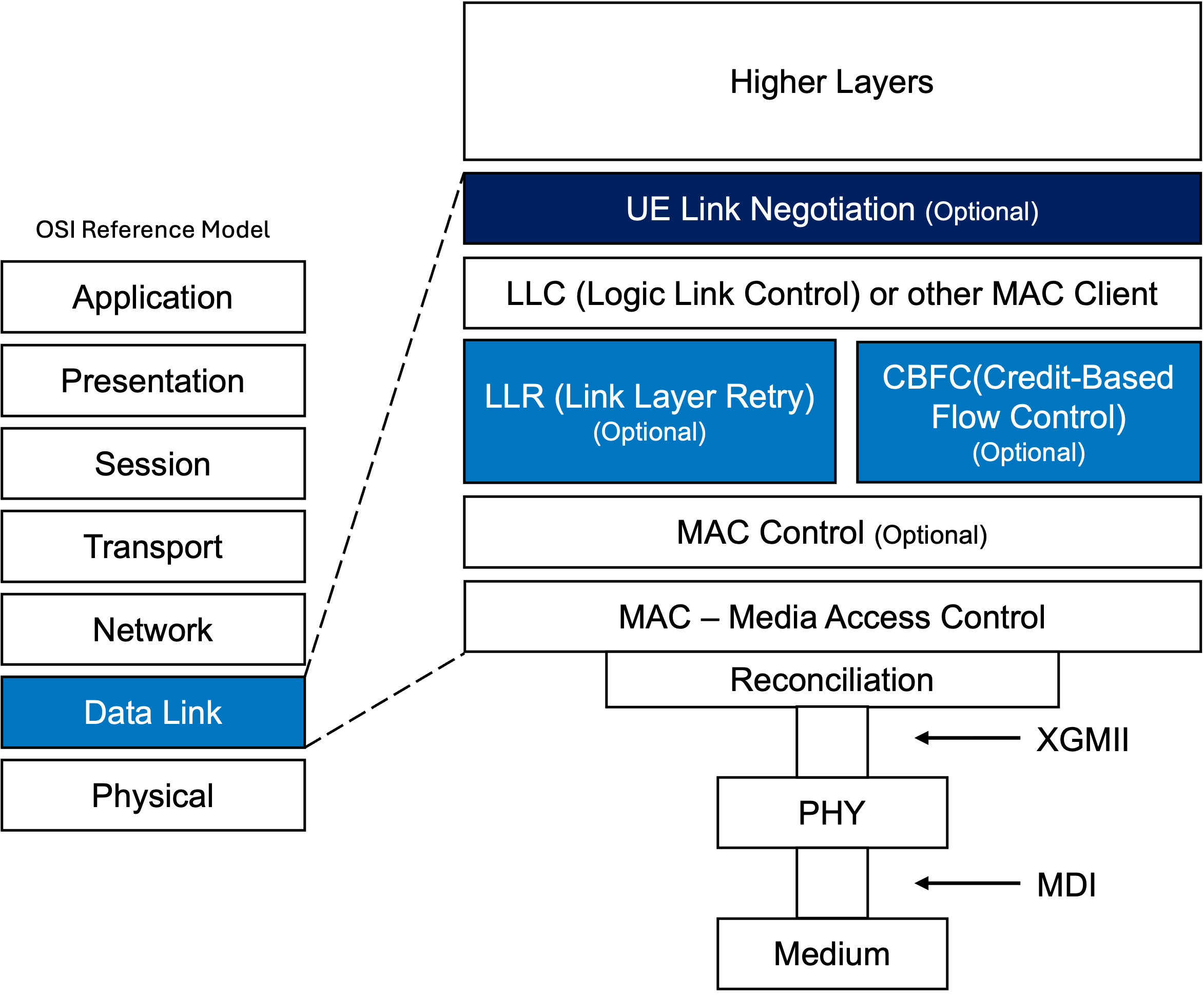
Fig. 3.30 Architectural Position of Link Negotiation in UE Link Layer
UE Link Negotiation defines the negotiation of optional link local features for the UE link layer that extend the operation of the UE link beyond those of a standard IEEE Std 802.3 Ethernet. These optional link local features can be used only on a UE link where both link partners support the optional features and desire to enable them.
To use UE Link Negotiation, the port must have at least one LLDP agent properly configured and enabled for transmission and receiving. Users need to select one of the LLDP agents on the port for UE Link Negotiation.
As soon as the LLDP agent is selected for UE Link Negotiation, the LLDPDU will include the UE Link Negotiation TLV(s) to advertise the supported and enabled optional link local features. The LLDP agent will also listen for the UE Link Negotiation TLV(s) from the link partner to learn about the supported and enabled optional link local features on the peer side. Based on the local and remote UE Link Negotiation TLV information, the LLDP agent will update the local and remote status accordingly.
There are a few important scenarios to note regarding the behavior of UE Link Negotiation:
Separate commands for UE Link Negotiation Options and UE Link Negotiation CBFC
There are separate commands for UE Link Negotiation Options and UE Link Negotiation CBFC. This allows users to have more granular control over the configuration of UE Link Negotiation.
Users can select the same LLDP agent for both UE Link Negotiation Options and UE Link Negotiation CBFC, or they can select different LLDP agents for each (if that is what they desire). Disabling UE Link Negotiation Options or UE Link Negotiation CBFC will not affect the other one, even if they are using the same LLDP agent.
Creating an LLDP agent doesn’t automatically enable UE Link Negotiation.
Users need to explicitly select the LLDP agent for UE Link Negotiation. This allows users to have more control over which LLDP agent and which optional link local features to use for UE Link Negotiation.
While Link Negotiation is enabled, it is allowed to delete the LLDP agent
While Link Negotiation is enabled, the LLDP agent selected for Link Negotiation can be deleted (by P_LLDP_DELETE or P_LLDP_INDICES). In this case, Link Negotiation will be stopped, and the local and remote statuses will be restored to the state they were in before Link Negotiation was enabled. If querying the status of the Link Negotiation configuration after the LLDP agent is deleted, it will return empty.
While Link Negotiation is enabled, it is allowed to switch to another LLDP agent
While Link Negotiation is enabled, you can switch to a different LLDP agent for Link Negotiation. In this case, the newly selected LLDP agent will continue using the current local and remote status.
No UE Link Negotiation TLV(s) present in the received LLDPDU
If no UE Link Negotiation TLVs are present in the LLDPDU received from the remote port, the port will determine that the remote port does not support UE link features and will update the remote status accordingly. The local status will be updated in accordance with the specification.
Remote LLDP agent stops sending LLDP frames or shuts down its LLDP
If the remote port stops sending LLDP frames or shuts down LLDP using the shutdown procedure defined in the LLDP specification, the port will determine that the remote port does not support UE link features and will update the remote status accordingly. The local status will be updated in accordance with the specification.
See also
Read how Link Negotiation Options behaves under the scenarios described above in P_UE_LINKNEG_OPTIONS and P_UE_LINKNEG_OPTIONS_STATUS.
Link Negotiation CLI Commands